

Download MenuTab Pro – Fast Facebook Access, No Ads, macOS Menu Bar App
Overview
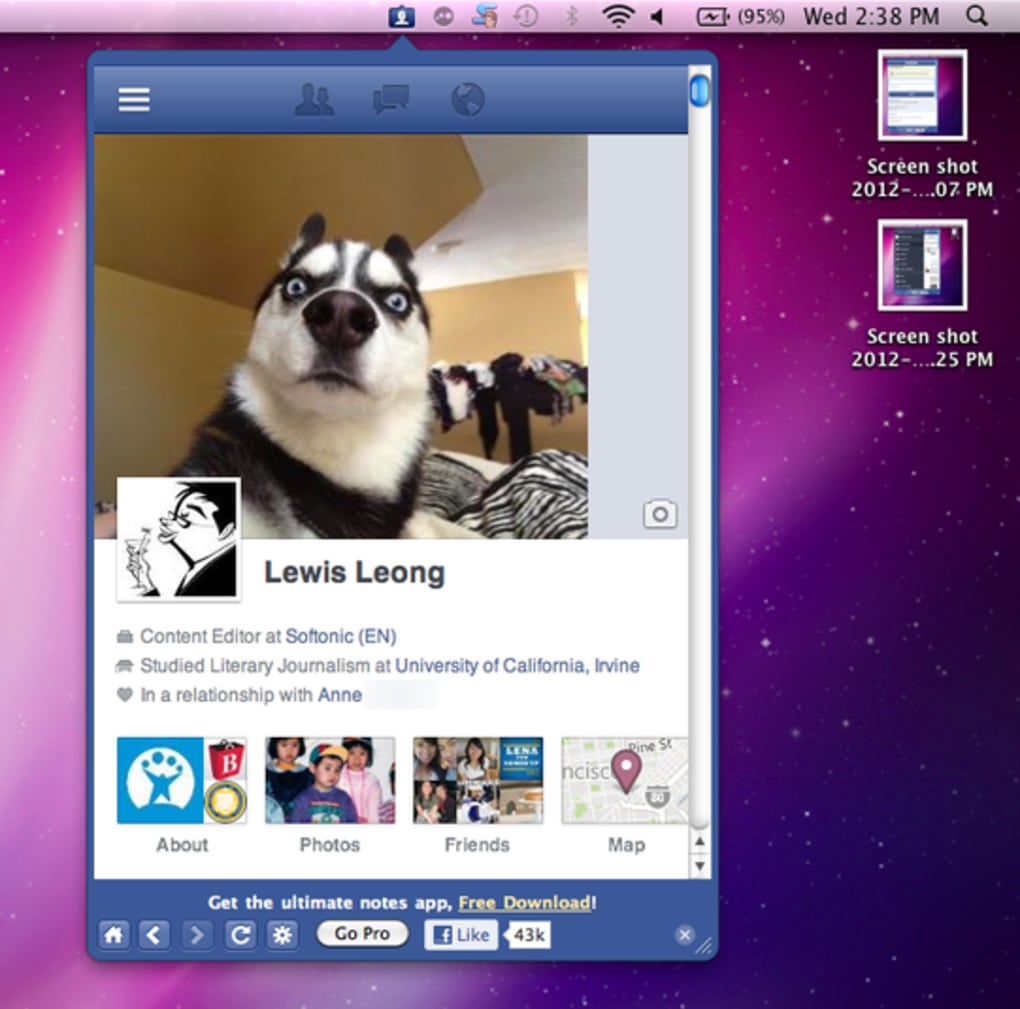
MenuTab Pro for Facebook is a lightweight macOS utility that lives permanently in your menu bar, giving you instant, ad‑free access to the Facebook mobile site. Unlike the free version, the Pro edition removes the intrusive “powered by MenuTab” banner and adds a suite of productivity‑focused enhancements such as colored notification badges, a resizable window, gesture support, and customizable keyboard shortcuts. When a new message, comment, or reaction arrives, the icon glows red, ensuring you never miss a notification while you’re working on other apps.
The interface mirrors the mobile Facebook layout, which means the familiar scrolling experience stays intact, but with added shortcuts that make it feel more like a native desktop app. For power users who spend a significant portion of their day on Facebook—whether for personal networking, community management, or social media marketing—MenuTab Pro streamlines the workflow by keeping the platform just one click away, without the clutter of a full‑screen browser tab. Its design philosophy is simple: deliver the core Facebook experience in a compact, secure, and always‑available window that respects your macOS aesthetic.
The app runs silently in the background, consuming minimal system resources, and it automatically updates to keep up with Facebook’s frequent UI changes. Overall, MenuTab Pro is positioned as the premium, ad‑free alternative for anyone who wants quick, reliable Facebook access directly from the menu bar.
Key Features and How They Improve Your Facebook Experience
- Ad‑Free Interface: Removes the free‑version banner and all third‑party ads, providing a clean view of your feed.
- Colored Notification Badges: Different colors for messages, comments, likes, and event reminders let you prioritize at a glance.
- Resizable Window: Drag the corners to fit the exact amount of screen real estate you need, from a compact sidebar to a full‑screen view.
- Gesture Support: Swipe left/right to navigate between news feed, profile, and Messenger without reaching for the mouse.
- Custom Keyboard Shortcut: Assign any key combination to open MenuTab Pro instantly, speeding up your workflow.
- Improved Chat Interface: Enhanced messenger window with quicker access to recent conversations and photo previews.
- Link Handling: Clicking a link opens it in your default browser, preserving the lightweight nature of the app.
- Automatic Updates: The app checks for Facebook UI changes and patches itself without manual intervention.
- Secure Login: Uses Apple’s native keychain for storing credentials, ensuring your login data stays encrypted.
The feature set is carefully crafted to address the most common pain points of using Facebook on a desktop. For instance, the colored badges replace the generic red dot, allowing you to differentiate a new private message from a group comment instantly. This visual cue reduces the time spent scrolling through notifications, which is especially valuable for community managers handling multiple pages.
Gesture support mimics the mobile experience, letting you flick through stories or switch tabs with a simple swipe—something that standard browsers cannot replicate without extensions. Moreover, the resizable window respects the macOS design language; you can dock the app next to your email client or keep it hidden until you need it. The custom keyboard shortcut is a game‑changer for power users who juggle several communication tools; a quick ⌘+Shift+F opens Facebook without breaking concentration.
By eliminating ads and providing a focused, responsive interface, MenuTab Pro transforms the otherwise cluttered Facebook experience into a streamlined, productivity‑centric workflow.
Installation, Setup, and System Compatibility
Supported Operating Systems
MenuTab Pro is built for macOS 10.14 (Mojave) and later, including macOS Ventura, Monterey, and Big Sur. The app takes advantage of the native menu bar APIs, ensuring smooth performance on both Intel‑based Macs and Apple Silicon (M1/M2) devices.
Step‑by‑Step Installation Guide
- Download the Installer: Click the “Download MenuTab Pro” button on the product page. The file is a signed
.dmgpackage, guaranteeing it’s free from malware. - Open the DMG: Double‑click the downloaded file. macOS will mount a virtual disk showing the MenuTab Pro app icon.
- Drag to Applications: Drag the MenuTab Pro icon into your
/Applicationsfolder. This step registers the app with Launchpad and the system. - First Launch & Permissions: Open the app from the Applications folder. macOS may prompt you to allow access to “Accessibility” and “Full Disk Access” for gesture support; click “Open System Preferences” and enable the toggles.
- Login to Facebook: Upon first launch, you’ll be presented with a login window. Use your standard Facebook credentials. The app stores the token securely in the macOS Keychain.
- Configure Preferences: Click the gear icon in the menu bar to access Settings. Here you can set your preferred keyboard shortcut, choose notification colors, and define the default window size.
Usage Tips for Maximum Efficiency
After installation, MenuTab Pro sits quietly in the menu bar. Clicking the icon instantly reveals the Facebook window. To keep the app running at startup, enable “Open at Login” in the Settings pane.
If you work with multiple Facebook accounts, you can switch accounts by signing out from the Settings menu and logging in with a different profile—each session is isolated and saved separately. For users who rely heavily on Messenger, enable the “Expanded Chat Panel” option to keep recent conversations pinned at the top of the window. Finally, take advantage of the gesture controls: swipe left to go back, swipe right to forward, and pinch to zoom in/out on photos.
These shortcuts replicate the mobile experience while preserving the speed of a native desktop app.
Pros and Cons
Advantages
- Ad‑free experience eliminates distractions and speeds up loading times.
- Colored notification badges provide instant visual cues for different event types.
- Resizable window adapts to any workflow, from minimal sidebar to full‑screen view.
- Gesture support offers a familiar mobile navigation feel on macOS.
- Custom keyboard shortcuts reduce the steps needed to open Facebook.
- Secure login via Apple Keychain protects user credentials.
- Automatic updates keep the app compatible with Facebook’s frequent UI changes.
- Low CPU and memory footprint makes it ideal for older Mac models.
Limitations
- The interface mirrors the mobile site, which can feel cramped compared to the full desktop version.
- Sending a message requires clicking “Reply” instead of pressing Return, slowing down chat speed.
- External links open in the default browser, breaking the “all‑in‑one” experience for some users.
- No native support for Facebook Pages or Groups management beyond the basic feed.
- Only available for macOS; Windows, Android, and iOS users must rely on the browser.
MenuTab Pro offers a sleek, ad‑free way to keep Facebook close at hand without sacrificing system performance. Its notification system and shortcut support make it a solid productivity tool for power users, though the mobile‑only UI may feel limiting for those who need full desktop functionality.
FAQ & Conclusion – Why MenuTab Pro Is Worth Your Click
Frequently Asked Questions
Conclusion – Take Control of Your Facebook Feed Today
If you spend a significant amount of time on Facebook and hate juggling between browser tabs, MenuTab Pro offers a focused, ad‑free solution that lives right in your macOS menu bar. The combination of colored notifications, resizable windows, and keyboard shortcuts means you can stay on top of messages, comments, and events without disrupting your primary workflow. While the app mirrors the mobile site and lacks some desktop‑only features, its lightweight design and secure login make it an excellent productivity companion for social media enthusiasts, community managers, and anyone who wants instant access to Facebook without the clutter of a full browser. At a modest one‑time price of $4.99, it delivers a premium experience that rivals many paid social‑media tools. Click the download button below, install MenuTab Pro, and enjoy a smoother, faster, and more secure Facebook experience right from your menu bar.
Download MenuTab Pro Now






